Stock Vault(Java/Android)
Android app to track inventory with typo-tolerant search, restock priority, and per-item alerts.

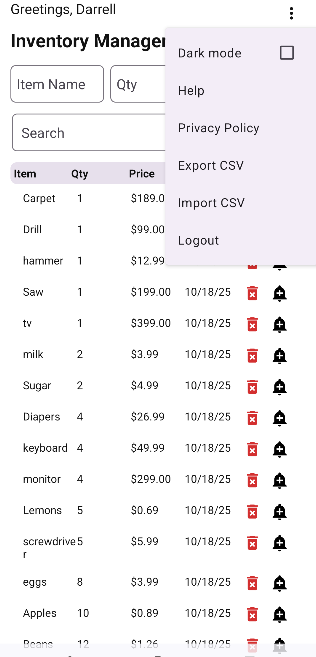
Description:
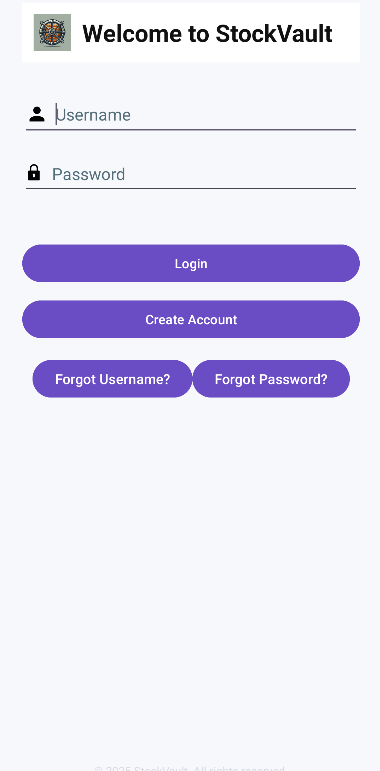
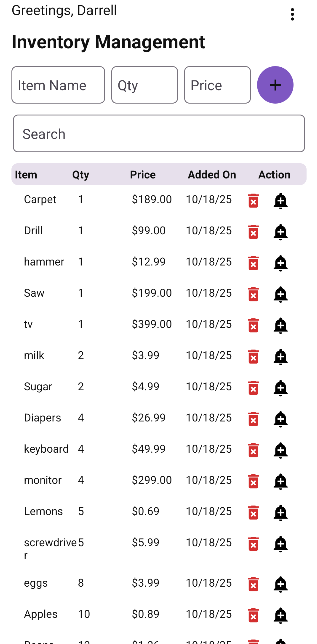
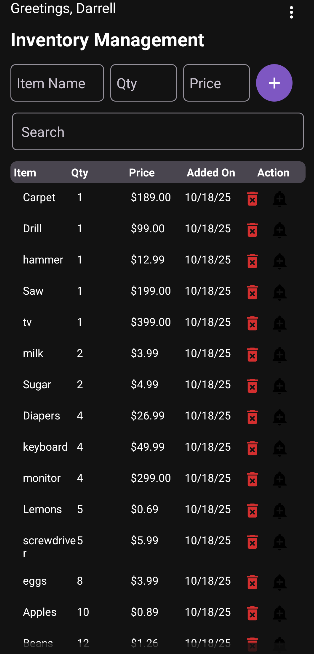
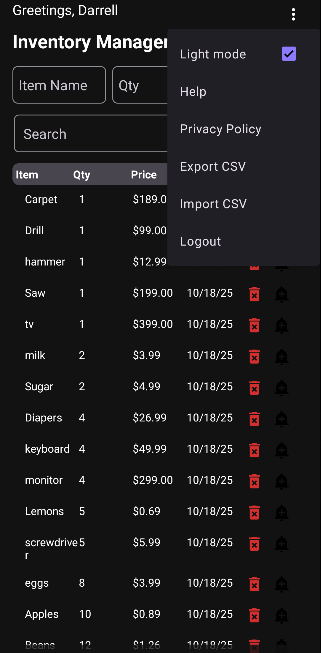
StockVault is a lightweight Android (Java) app for tracking inventory. You can add items, edit quantity and price, search with typos, and get alerts before you run out. Data is saved locally in SQLite so it works offline and stays private.
Completed as part of my personal graduation project for CS-499 Computer Science Capstone at Southern New Hampshire University.
Problems StockVault Solves:
Restocking on time: Surfaces items closest to their low-stock thresholds so you know what to buy next.
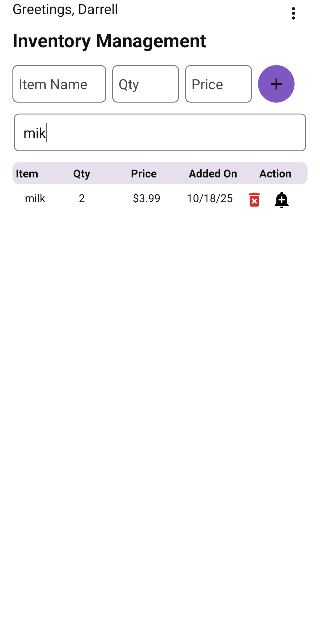
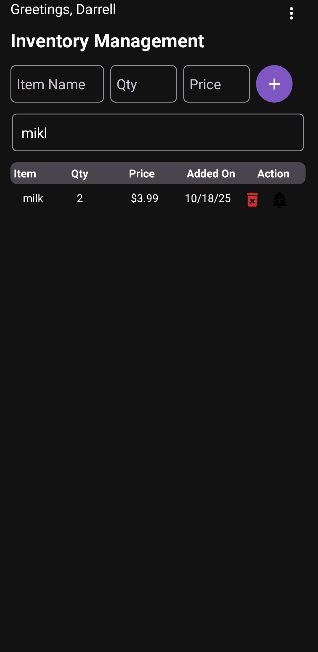
Finding items fast: Lets you search even with typos (“milk” vs “mikl”) and filters the list as you type.
Editing without friction: Long-press to edit right in the list—no extra screens or forms.
Works offline: Local storage keeps the app quick and usable anywhere.
Feature One
Smart Inventory Engine
- Restock-priority sorting: Items are ranked by urgency (quantity minus low-stock threshold), then by age (older first), then by name. This ensures the most important items float to the top.
- Live fuzzy search: A small, optimized edit-distance function powers typo-tolerant search. Results update after a short debounce (≈300 ms) so filtering feels instant without janky reflows.
- Fast UI updates: The app keeps an in-memory list of items. When you edit or add an item, it updates the list, re-sorts, and re-renders no full database reload.
Feature Two
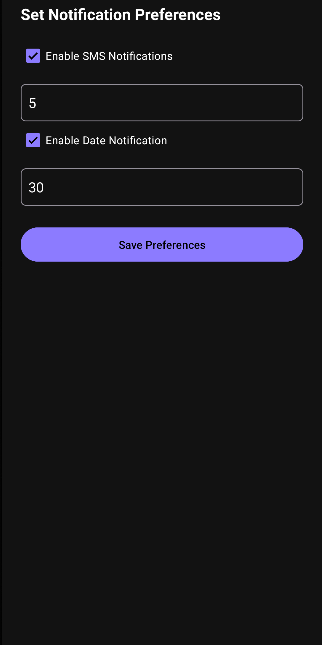
Per-Item Alerts & Preferences
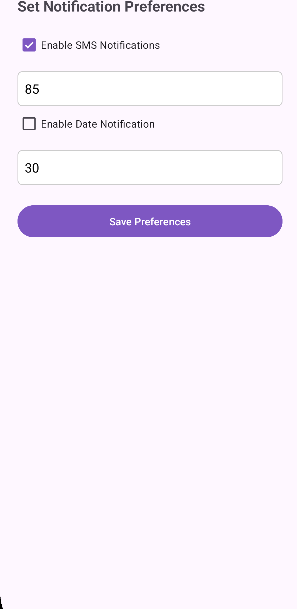
- Aging alerts: Optional date-based notifications remind you when items have been sitting too long (e.g., 30+ days).
- Android-native notifications: Uses a dedicated notification channel and supports Android 13 permission flow. Tapping a notification takes you right back into the app.
- Settings screen per item to enable/disable SMS-style alerts and set thresholds.
Feature Three
Inline Editing with Reliable Persistence
- Long-press to edit quantity or price directly in the list.
- Changes persist to SQLite via a repository layer, then auto re-sort and re-render.
- Safer parsing/validation and clear user feedback (toasts/logs) on every action.
How it works (under the hood)
Platform & storage
- Android + SQLite: Data lives locally for speed and offline use. A SQLiteOpenHelper (InventoryDatabase) manages schema creation and migrations.
- Schema highlights: inventory table tracks name, quantity, price, date added, and per-item notification prefs (threshold, alert toggles).
- SQLite item_prefs table stores per-item alert settings (ID-keyed). SharedPreferences/DataStore is used only for lightweight UI state.
Algorithms & data structures
- Restock comparator: Custom comparator ranks items by (quantity − threshold), then by age, then by name—simple, stable, and effective.
- Fuzzy search: An efficient edit-distance function (dynamic programming) handles short strings like item names. It runs only on the in-memory list after a debounce to keep typing smooth.
- In-memory cache: The full item list is stored in memory, then filtered/sorted for rendering. This keeps UI snappy and reduces DB churn.
Notifications
- Channels & permissions: Creates a channel on Android 8+ and requests POST_NOTIFICATIONS on Android 13+.
- Tap-through: Notifications include a PendingIntent that opens InventoryActivity.
- When they fire: Checks run on list refresh (add/edit/delete/return to screen). A background scheduler (e.g., WorkManager) can be added later if needed.
UX details that matter
- One-tap add: Quick form for name, qty, and price; date auto-filled.
- Inline validation: Clear messages if fields are empty or invalid.
- No surprises: After each change, the list re-sorts and the user sees the result immediately.
Security & privacy notes
- Local-first design: All data is stored on device. No network by default.
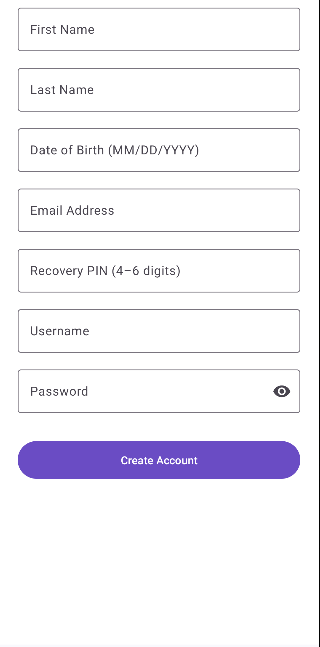
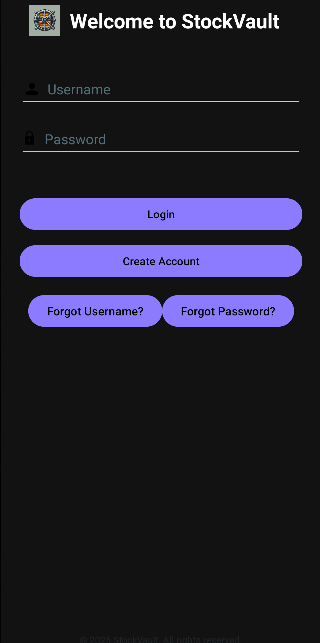
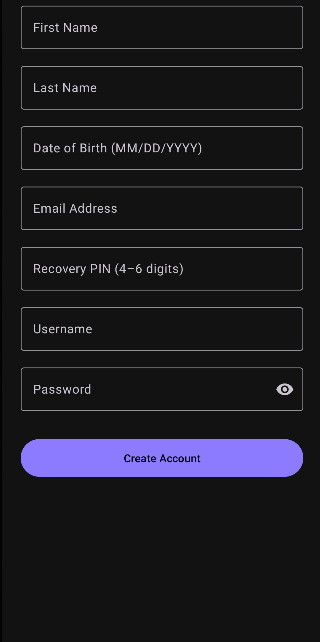
- No remote auth; the login shown is demo-only for UI. A production build would hash credentials (or use Google/biometric) and include a privacy policy.
- Permissions: Only requests notification permission when needed.
Performance choices
- Debounced text input reduces needless filtering while typing.
- Single-pass edit distance is used for short names—fast enough for mobile lists.
- Selective redraws: Edits update the in-memory model and re-render the visible list.
Testing & reliability
- Manual smoke tests: Add, edit, delete, and search paths verified across Android versions, including notification permission behavior.
- Logging: Targeted Log.d/Log.e statements help trace insert/update/notify flows during development.
Enhancement Process - Before & After
1.) Search: exact match → fuzzy, debounced filtering
Before (exact, no debounce – brittle & jumpy on large lists)
searchField.addTextChangedListener(new TextWatcher() {
public void onTextChanged(CharSequence s, int start, int before, int count) {
String q = s.toString().toLowerCase();
List- show = new ArrayList<>();
for (Item it : allItems) {
if (it.name.toLowerCase().contains(q)) show.add(it);
}
renderRows(show); // runs every keystroke
}
public void beforeTextChanged(CharSequence s, int a, int b, int c) {}
public void afterTextChanged(Editable s) {}
});
After (fuzzy search + debounce – smooth & typo-tolerant)
                            private static final long SEARCH_DEBOUNCE_MS = 300L;
                            private final Handler searchHandler = new Handler(Looper.getMainLooper());
                            private Runnable searchTask = null;
                            private String lastQuery = "";

                            searchField.addTextChangedListener(new TextWatcher() {
                                public void onTextChanged(CharSequence s, int start, int before, int count) {
                                    if (searchTask != null) searchHandler.removeCallbacks(searchTask);
                                    final String q = s.toString().trim();
                                    searchTask = () -> { if (!q.equals(lastQuery)) { lastQuery = q; filterAndRender(q); } };
                                    searchHandler.postDelayed(searchTask, SEARCH_DEBOUNCE_MS);
                                }
                                public void beforeTextChanged(CharSequence s, int a, int b, int c) {}
                                public void afterTextChanged(Editable s) {}
                            });

                            // Inside filterAndRender(...)
                            int dist = editDistance(qLower, nameLower);
                            boolean matches = nameLower.contains(qLower) || dist <= 2;
Result: Faster feel while typing, better matches with minor typos, fewer unnecessary UI redraws.
2.) Sorting: “added order” → restock-priority comparator
Before (implicit: whatever order the DB returned)
                            Cursor c = db.query("inventory", null, null, null, null, null, null);
                            // render in cursor order
After (urgent items first, then age, then name)
                            Collections.sort(allItems, (a, b) -> {
                                int ua = a.quantity - a.lowStockThreshold;
                                int ub = b.quantity - b.lowStockThreshold;
                                int byUrgency = Integer.compare(ua, ub);        // lower margin = more urgent
                                if (byUrgency != 0) return byUrgency;
                                int byAge = Integer.compare(daysSince(b.date), daysSince(a.date)); // older = higher priority
                                if (byAge != 0) return byAge;
                                return a.name.compareToIgnoreCase(b.name);
                            });
Result: The most critical items bubble to the top so restocking decisions are immediate and obvious.
3.) Notifications: global toggles → per-item preferences
Before (one-size-fits-all)
                            SharedPreferences sp = getSharedPreferences("Notif", MODE_PRIVATE);
                            boolean enableSms = sp.getBoolean("enableSms", false); // global
                            int threshold = sp.getInt("threshold", 5);              // global for all items
After (per item ID)
                            SharedPreferences perItem = getSharedPreferences("ItemNotificationPreferences", MODE_PRIVATE);
                            boolean enableSms = perItem.getBoolean("enableSms_" + itemId, false);
                            int lowStockThreshold = Integer.parseInt(perItem.getString("threshold_" + itemId, "5"));
                            boolean enableDateNotification = perItem.getBoolean("enableDateNotification_" + itemId, false);
                            int dateThresholdDays = Integer.parseInt(perItem.getString("dateThreshold_" + itemId, "30"));
Result: Users can tailor alerts per item (e.g., rice at 5, batteries at 2, milk with a 7-day age warning). Fewer noisy notifications, more signal.
4.) Editing: multi-screen forms → inline edits with instant resort
Before (navigate away, edit, save, come back)
                            row.setOnClickListener(v -> {
                                Intent i = new Intent(this, EditItemActivity.class);
                                i.putExtra("id", it.id);
                                startActivity(i);
                            });
After (long-press cell → inline edit → persist → resort and re-render)
                            qtyView.setOnLongClickListener(v -> {
                                EditText editQty = new EditText(this);
                                editQty.setText(String.valueOf(it.quantity));
                                row.removeView(qtyView);
                                row.addView(editQty, 1);

                                editQty.setOnEditorActionListener((v1, aId, ev) -> {
                                    int newQty = safeInt(editQty.getText().toString(), -1);
                                    if (newQty < 0) { toast("Enter a valid quantity."); return true; }

                                    repo.updateItem(it.id, it.name, newQty, it.price, it.date,
                                                    it.lowStockThreshold, it.enableSms, it.enableDateNotification);

                                    it.quantity = newQty;                // update in-memory
                                    row.removeView(editQty);
                                    row.addView(qtyView, 1);
                                    qtyView.setText(String.valueOf(newQty));

                                    reSortAndRender();                   // instant resort + refresh
                                    return true;
                                });
                                return true;
                            });
Result: Quick edits in place, no extra navigation, and the list instantly reorders to reflect urgency.
5.) Rendering: full reloads → targeted refresh with in-memory model
Before
                            updateItem(...){
                            db.update(...);
                            loadInventoryItems(); // re-query everything and rebuild the UI
                            }
After
                            updateItem(...){
                            db.update(...);     // persist
                            it.quantity = newQty; // update in-memory model
                            reSortAndRender();  // resort + render currently visible rows only
                            }
Result: Snappier UI and less database churn-especially noticeable on lower-end devices.
Database
Stack: SQLite (SQLiteOpenHelper) + SharedPreferences (per-item alert toggles).
Why: Fast, offline-first storage with simple, reliable reads/writes.
Schema (minimal)
                            CREATE TABLE items (
                                id INTEGER PRIMARY KEY AUTOINCREMENT,
                                name TEXT NOT NULL,
                                quantity INTEGER NOT NULL DEFAULT 0,
                                low_stock_threshold INTEGER NOT NULL DEFAULT 5,
                                price REAL NOT NULL DEFAULT 0,
                                date_added INTEGER NOT NULL,
                                last_updated INTEGER NOT NULL
                            );

                            CREATE TABLE item_prefs (
                                item_id INTEGER PRIMARY KEY REFERENCES items(id) ON DELETE CASCADE,
                                enable_qty_alert INTEGER NOT NULL DEFAULT 0,
                                enable_age_alert INTEGER NOT NULL DEFAULT 0,
                                age_days_threshold INTEGER NOT NULL DEFAULT 30
                            );
Restock order (urgent → older → name)
                                SELECT * FROM items
                                ORDER BY (quantity - low_stock_threshold) ASC,
                                    (strftime('%s','now') - date_added) DESC,
                                    name COLLATE NOCASE ASC;
Low-stock filter
                                SELECT id,name,quantity,low_stock_threshold
                                FROM items
                                WHERE quantity <= low_stock_threshold;
Data flow & reliability
- Load rows → keep an in-memory list for instant sort/filter.
- Inline edits: transactional UPDATE, then resort & re-render visible rows.
- Basic constraints + defaults prevent bad data (e.g., negative qty).
Small roadmap
- Move to Room DAOs & migrations.
- Add FTS5 for larger, typo-tolerant search.
- Filter Button to allow user control of how the table filters.
SNHU Capstone Enhancements
Informal Code Review Video:
Enhancement One: Software Design and Engineering
Artifact (what/when).
StockVault Android app (Java). Core screens and architecture created during CS-499 (2025), with enhancements to the inventory list, editing flow, and notifications.
Why it's in my ePortfolio.
This artifact shows end-to-end software design: requirements, UI flow, and a maintainable code structure. The enhancement moved the app from a basic CRUD list to a well-engineered product:
- Replaced multi-screen edit forms with inline editing and clear validation.
- Introduced a repository layer between UI and SQLite for cleaner separation.
- Added Android notification channels and a settings surface.
What I learned / challenges / feedback.
I learned how small design choices (like editing in place) reduce friction and increase reliability. The biggest challenge was avoiding full list reloads after writes; I solved this with an in-memory model and selective re-renders. Peer feedback pushed me to improve error messages and empty states. Outcomes met. Software design principles (modularity, separation of concerns), usability, and basic DevOps (release build/signing prep). Not fully met. Automated UI test coverage and CI are limited; I plan to add Espresso tests and a build pipeline.
Enhancement Two: Algorithms and Data Structure
Artifact (what/when).
The inventory list logic and search/sort engine, refined during CS-499 (2025).
Why it’s in my ePortfolio.
It demonstrates practical algorithm use inside a mobile app:
- Restock-priority comparator: orders by (quantity − threshold), then by age, then name—simple, stable, and effective.
- Fuzzy search with debounce: a lightweight edit-distance check plus ~300 ms debounce to keep typing smooth.
- In-memory caching: the full item list is kept in memory, then filtered/sorted for rendering.
What I learned / challenges / feedback.
I saw how the right O(1)/O(n) choices matter more than heavy frameworks on phones. Debouncing removed jank; a single-pass edit-distance was “good enough” for short names. The main challenge was balancing accuracy and speed; feedback led me to cap the distance check and prefer prefix matches first. Outcomes met. Applied algorithms for ranking and text matching; performance tuning and responsiveness. Not fully met. No advanced IR (e.g., FTS5) yet; that’s on my roadmap for larger datasets.
Enhancement Three: Databases
Artifact (what/when).
SQLite schema and data layer for StockVault, built/enhanced during CS-499 (2025).
Why it’s in my ePortfolio.
It shows I can design and ship a reliable offline-first data model:
- Tables: items (name, qty, price, thresholds, timestamps) and item_prefs (per-item alerts).
- Transactions for edits, constraints/defaults to prevent bad data, and indexes for name search/restock queries.
- A clear migration path (adding last_updated, indexing, etc.).
What I learned / challenges / feedback.
I learned to keep the schema lean and let the UI cache do the heavy lifting. The challenge was avoiding extra DB churn; I now update the row, re-sort in memory, and only re-render what’s visible. Feedback from testing led me to add better input checks and to separate alert prefs from item rows. Outcomes met. Data modeling, persistence, and reliability (transactions, indexes). Not fully met. No encryption-at-rest or cloud sync yet; planned next are Room/DAO migration, CSV import/export, and optional SQLCipher.
For more information and details, Please visit the Source page to view the README.md
NOTE:This project was designed and created by me as my first Java/Android Project.